
 Vlad Kalashnikov is Head of Products at CFOUR Comply, an inline XBRL (iXBRL) conversion software. Through direct involvement in customer onboarding, he works closely with teams navigating these requirements, giving him firsthand insight into the operational realities firms face with tagging and the challenges corporate service providers encounter delivering these services at scale.
XBRL (eXtensible Business Reporting Language) filing is the submission of structured financial data using machine-readable tags defined by a recognised taxonomy. Instead of filing a PDF or Word document, filers apply XBRL tags to each line item — revenue, profit, equity, so that regulators, investors, and other systems can read, compare, and process data automatically. XBRL filing is mandatory for listed companies under ESEF (EU), for UK-listed companies under UKSEF, and for all Dutch companies with filing obligations under SBR (FY2025 onwards, under Staatsblad 2024, 428).
The benefits of XBRL include reduced manual rekeying, improved data quality, faster regulatory review, and better investor comparability. XBRL filing software, including CFOUR Comply, automates the tagging, validation, and submission process.
What is XBRL Filing?
XBRL filing is the process of submitting financial reports in a structured digital format, making data easier to analyse and compare. Instead of static documents, reports use XBRL tags that label each data point, ensuring accuracy and consistency.
XBRL financial statements must be tagged using an approved taxonomy and validated before submission. XBRL filing is required under various regulatory frameworks, including:
- ESEF (European Single Electronic Format) – Mandatory for listed companies in the European Economic Area (EEA).
- SBR (Standard Business Reporting) — mandatory for Dutch companies for financial years starting 1 January 2025 (under Staatsblad 2024, 428).
- CSRD (Corporate Sustainability Reporting Directive) – Expands reporting obligations to sustainability data.
Key components of XBRL filing include:
- XBRL taxonomy – Defines standard tags for financial data.
- Tagging financial data – Assigns unique codes to different financial elements.
- Digital reporting format – Converts reports into machine-readable structures.
XBRL filing is the process of submitting financial reports in a structured digital format, making data easier to analyse and compare. Instead of static documents, reports use XBRL tags that label each data point, ensuring accuracy and consistency.
XBRL vs. iXBRL
While XBRL provides a structured data format, iXBRL (Inline XBRL) is now the preferred standard.
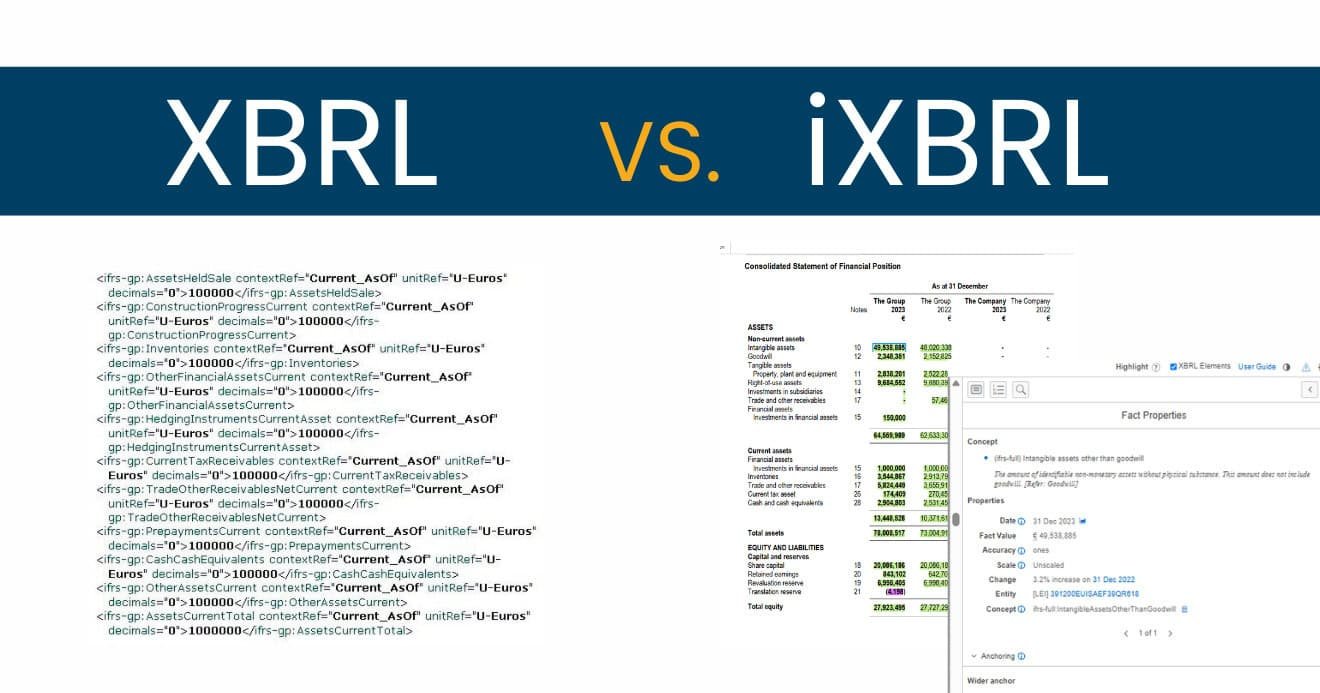
- XBRL stores financial data separately from its presentation, making it ideal for automated processing.
- iXBRL integrates XBRL tags directly into an XHTML document, allowing both humans and machines to read the report.
Today, iXBRL is widely used for reporting. ESEF and UKSEF require reports to be submitted as iXBRL embedded in XHTML documents. SBR accepts both XBRL and iXBRL. iXBRL is recommended as it preserves report layout while carrying machine-readable tags. Modern XBRL software solutions, such as CFOUR Comply, support the iXBRL/XHTML format.
==
.xbri – A New Format Requirement for iXBRL Fillings 2025
XBRL reports are submitted in one of two formats: .xbrl (an XML-based XBRL instance document) or .xhtml (an Inline XBRL document, where XBRL tags are embedded within XHTML). For ESEF, SBR, and UKSEF submissions, iXBRL/XHTML is required — this allows the document to be human-readable in a browser while simultaneously carrying machine-readable XBRL tags.
Starting from FY2025, ESEF reports must be submitted in iXBRL format (Inline XBRL embedded within XHTML). SBR accepts both XBRL and iXBRL from FY2025. iXBRL is the recommended format for SBR.
CFOUR Comply generates XBRL in the new .xbri format, ensuring full compliance with the updated regulatory requirements.
The XBRL Benefits
iXBRL offers several advantages for businesses and regulators:
- Greater accuracy — reduces human errors in financial reporting.
- Faster processing — automates data extraction and validation.
- Improved transparency — provides consistent and comparable reports.
- Regulatory compliance — meets global financial reporting standards.
- Cost efficiency — lowers administrative burden over time.
By using XBRL, organisations can enhance financial data integrity and manage compliance with evolving regulations more effectively.
Drawbacks of XBRL Filing
Despite its benefits, XBRL filing presents some challenges:
- Complexity — first-time users may find tagging financial data difficult.
- Initial costs — investing in XBRL software and training is required.
- Time-consuming — preparing reports correctly takes effort.
- Regulatory updates — businesses must stay informed on changing XBRL taxonomy.
These challenges can be managed by choosing user-friendly XBRL solutions, such as CFOUR Comply, which automate tagging and validation.
How to Get Started with XBRL Filing
A structured approach makes XBRL filing easier:
- Understand regulatory requirements — identify the reporting framework relevant to your business (ESEF, SBR, CSRD, CbCR, or UKSEF).
- Choose the right XBRL filing software — select a solution that automates compliance and supports the frameworks you need.
- Tag financial data correctly — use the XBRL taxonomy to apply the correct labels to each line item.
- Validate and submit — ensure the report meets regulatory standards before submission.
Starting early reduces pressure and avoids last-minute errors. CFOUR Comply handles the XBRL filing process end to end — tagging, validation, and output generation for ESEF, SBR, UKSEF, and CbCR.
Choosing XBRL Filing Software
When selecting XBRL filing software, look for: XBRL International certification (confirming conformance with the XBRL specification), support for the regulatory frameworks relevant to your organisation, built-in taxonomy validation, collaboration features for multi-user workflows, and a clear audit trail for submissions. For a detailed comparison of available platforms, see our review of best XBRL software solutions.
Conclusion
XBRL filing is a key requirement for regulatory compliance, offering greater accuracy, efficiency, and transparency in financial reporting. While it presents some initial challenges, the right tools make compliance manageable for any finance team.
Request a demo of CFOUR Comply to see how it handles XBRL tagging, validation, and submission for your specific reporting framework.
Frequently Asked Questions (FAQs) about XBRL Filling
- What is XBRL filing?
XBRL filing is the submission of financial reports in which data items have been tagged using XBRL (eXtensible Business Reporting Language) according to a recognised taxonomy. Instead of a static document, the filed report contains structured, machine-readable data that regulators and investors can process automatically. For EU-listed companies, XBRL filing under ESEF requires reports to be submitted as iXBRL embedded in XHTML.
- What companies need XBRL?
Companies that are publicly listed or subject to regulatory reporting requirements need to use XBRL for filing their financial reports. In the EU, publicly listed companies are required to file their annual financial reports in iXBRL under the ESEF regulation. Dutch companies (medium and large) must file in XBRL or iXBRL under SBR for financial years starting 1 January 2025; iXBRL is the recommended format.
- What is the difference between XBRL and iXBRL?
XBRL is the underlying tagging standard. iXBRL (Inline XBRL) is the delivery format: XBRL tags embedded within an XHTML document. This makes the report both human-readable (visible in a browser) and machine-readable (processable by regulatory systems). ESEF and UKSEF require iXBRL submission. SBR accepts both XBRL and iXBRL. iXBRL is the recommended format.
- What are the benefits of XBRL filing?
XBRL filing reduces manual data rekeying, improves accuracy through taxonomy-based validation, enables automatic comparison across companies and periods, and speeds up regulatory review. For companies, it reduces the risk of filing errors and improves the quality of public disclosures.
- What XBRL filing software does CFOUR Comply support?
CFOUR Comply supports iXBRL creation for ESEF, SBR (Netherlands), UKSEF, and CbCR. Reports are validated using Fujitsu’s Interstage XWand engine before submission.
- What do you mean by XBRL reporting?
XBRL reporting involves using the XBRL format to create and submit structured financial reports. These reports are machine-readable, making it easier to automate analysis and ensure consistency across financial data.
- Can you open XBRL with Excel?
Yes, you can open XBRL files with Excel, but it requires an XBRL add-in or specialised software to interpret and display the data in a usable format.